Indeed, in order to be as generic as possible, YOCaml provides a library that allows you to describe arbitrary data (which can be transformed into the description language of a template engine, arbitrarily, or serialized into the form of our choice) and to have it validated, from any arbitrary format.
Creating a custom data model is crucial for building an original site and for not locking yourself into the default models provided by YOCaml. It is for this freedom that YOcaml offers a flexible API that strives to validate any form of data. Using the default archetypes, as we saw in the tutorial on the simple blog, is a very good tool to start and get familiar with YOCaml. However, the ultimate goal is to give you the freedom to structure your documents as you wish, in order to build the most personal websites possible!
Validation and projection
When building a site generator, whether static or not, we generally want to be able to attach metadata to documents in order to control how we want to render them (in HTML, for example). For that, we need to be able to do three essential things:
-
Extract metadata from the document: that is, describe how the data is included in a document. In the previous examples, we used the Front Matter approach, which simply consists of using
---to separate the metadata from the document. -
Validate the extracted metadata: that is, ensure that the document actually contains the required data (and that it has the correct structure). In YOCaml, we use a specific format,
Yocaml.Data.t. Metadata is first extracted according to an extraction strategy, then from a source format (for exampleYaml,ToML, orSexp), it is converted into theYocaml.Data.tformat. After that, we apply validations that allow us to convert ourYocaml.Data.tinto a type of our choice. -
Inject the validated data: once our data is validated, we want to be able to concretely generate our document, meaning transform our type into
Yocaml.Data.t(and let YOCaml convert it into the language understood by the template engine).
You will have understood that, in order to be as generic as possible and able to adapt to as many situations as possible, YOCaml uses a very simple intermediate representation format that acts as a relay.
Here is a schematic example of how the hypothetical article generation process works, from reading to writing:
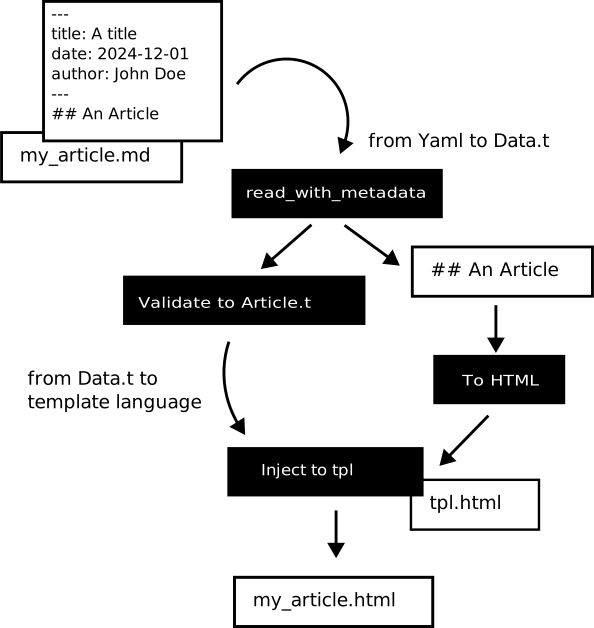
The generic handling of metadata is organized around several interfaces (signatures):
-
DATA_PROVIDERwhich allows you to describe a description language (such as Yaml or ToML). It explains how to go from the data type (Yaml or ToML) toYocaml.Data.t. -
DATA_READABLEdescribes how to convert metadata expressed in a language defined by aDATA_PROVIDERinto structured data. -
DATA_INJECTABLEdescribes how to normalize data so that it can be injected into a template.
In practice, when we want to describe metadata, we generally define a module of the following form:
module type M = sig
  type t (* Metadata's type *)

  include Yocaml.Required.DATA_READABLE with type t := t
  include Yocaml.Required.DATA_INJECTABLE with type t := t
end
By including these two modules, the types described by the module can be read as metadata from files and injected into templates to produce artifacts. However, sometimes we may want to distinguish between the types we want to consume and the ones we want to inject, which is why there are two different interfaces.
Now that we understand the main ideas, we will see how to describe data (normalize it) and how to validate data.
Naming conventions
Usually, we apply the following naming conventions:
-
to_data:t Data.converter, which allows transforming arbitrary data into YOCaml’s data model. -
from_data:t Data.validable, which allows validating data from YOCaml’s data model into an arbitrary type. -
normalize:t -> (string * Data.t) list, which allows normalizing an arbitrary type into a template. -
validate:t Data.validable, which allows validating data from YOCaml’s data model into an arbitrary type (to be read from a file).
In the
Yocaml.Metadata
module there are functors to move from one representation to another.
However, generally, the from_data and to_data functions are mainly
used to build the data model and validate heterogeneous data, while
normalize and validate are used to work with file reading and
writing.
In the next section, we will see how to describe/project data while respecting the YOCaml format.